Texecom Smartcom flashing blue cloud led

Joined
13 Nov 2010
Messages
108
Reaction score
0
Country
United Kingdom
Hi

I have my smartcom directly connected to the ont so it shouldn't have a firewall/isp parental settings blocking communication. I have tried unplugging both plugs to reboot it. Yet the cloud led is still flashing. When I try enabling the app it's says "incorrect config call terminated"

According to the label on the box the smartcom uses version 4 firmware and my panel uses version 5
 
Last edited:
HI experts, going back to this fault my system had to be reset and since when trying to generate an app code to connect the phone app I get the same error "incorrect config call terminated" and UDL lockout on the keypad. I know the UDL password is default 1234 and set correctly and I can connect to the panel by wintex from the PC..All I need to do is get a code to connect to the phone app Any tips what is set incorrectly Thanks
 
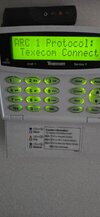
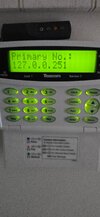
As I have not got a lot of experience DIY installed the panel 20 years ago and added smartcom later and it was working ,enclosed screen shots If you can please tell me if they are correct
Screenshot (9).png
Screenshot (10).png
Screenshot (8).png
 
just un-program it and reprogram it back up.
If still having an issue power cycle the panel.

Elite panels are about 15/16years old Max for a V1.

then lt us know what happens.

It noted that a smart com pro cn only be used in monitor mode where as the standard smartcom can do either.
 
Primary number should be 127.0.0.251
 

Attachments

  • 20261010_112335.jpg
    20261010_112335.jpg
    398.4 KB · Views: 3
  • 20261010_112324.jpg
    20261010_112324.jpg
    394.1 KB · Views: 3
As Secureiam, just reverse all programming for the Smartcom, and then start from scratch, that should auto populate ARC settings etc etc as required.
 
Sorry typo 127.0.0.251 is what I set at.I have reset the smartcom and now it wont connect at all to wintex using ethernet. I think its too old as it is an early version ,What's the cost to have an up to date texecom panel fitted with new sounder and programmed ,I have 7 working zones in the GU14 area
 
Last edited:
give us a call we should be able to sort this remotely for you or dvise on what needs to be done.
elite panel v5 is fine with the smart com, is it connected via wifi or via ethernet.

the smart com needs to V2 or higher.

The generating of the pp code, just needs things to be done in sequence and should be fine, hence power cycle of the panel if programmed correctly should resolve.

note the smart com pro uses monitor mode only where as smart com can use either.
 
Thanks sort of got it up and running by rebooting the panel but the app is asking me for installer ID which i dont have
 
set one up using texecom cloud, if your struggling we can put it on our portal for now until you get an account setup and request it trnsfering over.

loads on here have done there own installer setup, so it should be possible depending on how you answer the questions
 
the power cycle for reference, makes the panel load up in a certain way so if everything is programmed correctly it gets propagated properly and away you go.
 

If you need to find a tradesperson to get your job done, please try our local search below, or if you are doing it yourself you can find suppliers local to you.

Select the supplier or trade you require, enter your location to begin your search.


Are you a trade or supplier? You can create your listing free at DIYnot Local

 
Back
Top