• Looking for a smarter way to manage your heating this winter? We’ve been testing the new Aqara Radiator Thermostat W600 to see how quiet, accurate and easy it is to use around the home. Click here read our review.

Accenta8 Alarm - Dead or Alive?

Joined
9 Aug 2025
Messages
734
Reaction score
88
Country
United Kingdom
Old Accenta8 professionally installed in 1998, regular serviced until recently when business went bust. Battery last changed 5'ish years ago, maybe longer. All working well, battery ordered but not fitted. Manual downloaded. Last week, after 10 months of waiting Octopus finally installed our Smart meters. Install took 3.5 hours with the power off for two.
Alarm on backup silenced with code.
With power backup, the keypad shows no zone, power, tamper etc leds but the keys are lit. Keypad does not respond to any pressing or our code.
Wallbox power illuminated.
Pull the supply fuse alarm starts.
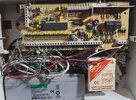
Changed the battery today 12.88vdc, nothing went off, checked the pcb and couldn't see any visual issues.
Closed the lid, and pulled the fuse and left it for 20 seconds, nothing, zip, nada.
Keypad illuminated but still no led indicators.
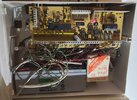
PCB pic added.

What's my next actions, if any?
Downloaded Engineers Manual

Do I simply upgrade and install new?

TIA
 

Attachments

  • 20250812_161910.jpg
    20250812_161910.jpg
    292.3 KB · Views: 37
What’s coming out of the battery leads ( battery removed ) ….should be 13.8v dc ….also check aux volts …and keypad supply volts at the panel …they should all be about the same ….battery charge resistor looks ok
 
What’s coming out of the battery leads ( battery removed ) ….should be 13.8v dc ….also check aux volts …and keypad supply volts at the panel …they should all be about the same ….battery charge resistor looks ok
Thanks sparkymarka.
I'll work through the voltages tomorrow and post them up.
 
Removed cover, no bell, speaker, or tamper.

Tested voltages as follows;
New Batt charged to 13.47vdc was 12.88vdc
@Battery leads 14.21v
@Keypad 14.22vdc
@Aux (assumed centre top row) 14.23vdc

All room sensors on walk throughs are indicating movement.

Read manual, next steps, advise please.
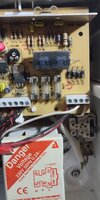
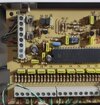
Better pics (3) added.
 

Attachments

  • 20250813_131123.jpg
    20250813_131123.jpg
    408.6 KB · Views: 20
  • 20250813_125511.jpg
    20250813_125511.jpg
    202.4 KB · Views: 21
  • 20250813_125505.jpg
    20250813_125505.jpg
    468.7 KB · Views: 22
If you close all the tampers and the reset does not bring the keypad back to life, you need to perform a procedure where you remove all power, short a couple of the PCBs terminals together, then reinstate power.

The trouble is, I no longer have the manuals, but I used to do this on systems with old batteries where lightning had struck and locked out the keypads.
 
It's the section called defaulting to factory settings, as, once you have done it, the panel reverts to factory settings, all codes and other settings are lost.

If you have the manual, it should explain exactly what you need to do.

The terminals are different depending on which panel you have, so make sure you have the correct manual for your panel or there could be a large puff of smoke!
 
It's the section called defaulting to factory settings, as, once you have done it, the panel reverts to factory settings, all codes and other settings are lost.

If you have the manual, it should explain exactly what you need to do.

The terminals are different depending on which panel you have, so make sure you have the correct manual for your panel or there could be a large puff of smoke!
Thanks SecureSpark. Its amazing how much more confident you feel when theres input from you more knowledgeable types.

The manual I have is correct with the physical PCB, matching the engineering documentation.
# 2.7 Headed : NVM PowerUp Reset , clears the NVM jumping terminal 17PA to SET at Terminal 27.

If thats next , I may need to reread the Engineer Programming Section again! Original installer left some good notes on the original setup which should make the process easier!!
 
That seems to have jogged the memory.

Shorting between the left hand PA terminal and the SET terminal.
 
That seems to have jogged the memory.

Shorting between the left hand PA terminal and the SET terminal.
So says the engineers manual.

It has got me thinking about "upgrading" but I'll start a new thread.
 
Defaulting the panel is normally the last resort and 9 out 10 times it won’t solve the issue
I think that's where I'm at though.
I welcome any other suggestions....
I think I've been lucky as it all seems to be working as it should, with most of the common issues on these old systems, working fine on mine.
The fact that the Engineers Manual specifies and documents my scenario, indicates to me that its a choice I need to at least try?
Advice welcomed and taken.
 

If you need to find a tradesperson to get your job done, please try our local search below, or if you are doing it yourself you can find suppliers local to you.

Select the supplier or trade you require, enter your location to begin your search.


Are you a trade or supplier? You can create your listing free at DIYnot Local

 
Back
Top