Hi all, I'm having a little problem getting my led lights to dim! I installed some dimmable led lights, and attached a dimmer switch! Light go on and off, bit won't dim! I've attached some pictures, am I doing something wrong? There's 2 switches in my room, so far I've only replaced one to a dimmer switch, could that be the issue? Thanks

You are using an out of date browser. It may not display this or other websites correctly.
You should upgrade or use an alternative browser.
You should upgrade or use an alternative browser.
Dimmable leds bit dimming!
- Thread starter enz
- Start date
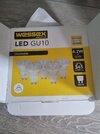
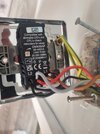
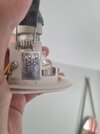
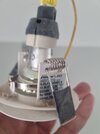

- Joined
- 27 Jan 2008
- Messages
- 29,234
- Reaction score
- 3,585
- Location
- Llanfair Caereinion, Nr Welshpool
- Country

I use smart bulbs when I want to dim lamps, as it also can adjust the colour to give the ambiance I want.
Change the dimmer for a proper LED dimmer switch

Use this dimmer: https://www.screwfix.com/p/varilight-v-pro-1-gang-2-way-led-dimmer-switch-white/94816a dimmer switch!
If you want it on a metal plate, buy that white one, the dimmer module can be removed from it and installed on the metal plate you already have,.
If they both do the same light then only one of them can be a dimmer.There's 2 switches in my room,
Thanks mate, says up to 10 bulbs but have 14 in my room, will that still work? Also yes both switches are connected to the same lights, does that mean I can only have 1 dimmable switch? ThanksUse this dimmer: https://www.screwfix.com/p/varilight-v-pro-1-gang-2-way-led-dimmer-switch-white/94816
If you want it on a metal plate, buy that white one, the dimmer module can be removed from it and installed on the metal plate you already have,.

I agree the dimmer minimum power of 60W is very high (assuming you don't have 15 of those lights) however I'm guessing it's wired wrong anyway. I would have expected the red wire to be in L2Hi all, I'm having a little problem getting my led lights to dim! I installed some dimmable led lights, and attached a dimmer switch! Light go on and off, bit won't dim! I've attached some pictures, am I doing something wrong? There's 2 switches in my room, so far I've only replaced one to a dimmer switch, could that be the issue? Thanks
Do you mean L1? @SUNRAYI agree the dimmer minimum power of 60W is very high (assuming you don't have 15 of those lights) however I'm guessing it's wired wrong anyway. I would have expected the red wire to be in L2
Last edited:
Ah OK with 14 it should work.I agree the dimmer minimum power of 60W is very high (assuming you don't have 15 of those lights) however I'm guessing it's wired wrong anyway. I would have expected the red wire to be in L2
Are you saying you have installed 2 dimmers? I believe only one can be used.
Can we have a pic of the other switches wiring please?
If the brown/black/grey cable goes to the other switch and there are no other cable at the other switch I'd expect it to be wired something like this:
What I see is this
Please look at the other switch before making changes
EDIT: Apologies, I've drawn this differently to what you currently have, hold fire while I amend my drawing
Last edited:
Should be:Ah OK with 14 it should work.
Are you saying you have installed 2 dimmers? I believe only one can be used.
Can we have a pic of the other switches wiring please?
If the brown/black/grey cable goes to the other switch and there are no other cable at the other switch I'd expect it to be wired something like this:View attachment 392319
What I see is this
View attachment 392320
Please look at the other switch before making changes
EDIT: Apologies, I've drawn this differently to what you currently hold fire while I amend my drawing
I see :
This is assuming the other switch (that shown on the right) is wired as shown here.
Picture of the other switch wiring please
In fact what I've unknowingly done is draw the same wiring as this from the dimmers instruction sheet
 Except I've drawn it showing the terminals in the physical order of the dimmer.
It could better be shown as:

It could better be shown as:
Last edited:
Thanks mate, here's the 2nd switch! 2nd switch is just a regular one, not dimmable! It works fine as currently wired!In fact what I've unknowingly done is draw the same wiring as this from the dimmers instruction sheet
View attachment 392324Except I've drawn it showing the terminals in the physical order of the dimmer.
It could better be shown as:
View attachment 392325
Attachments
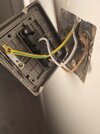
Do you mean L1? @SUNRAY
Excellent, yes I did mean L1 but apologies I inadvertantly drew my coloured sketch reversed.Thanks mate, here's the 2nd switch! 2nd switch is just a regular one, not dimmable! It works fine as currently wired!
Yes move the red to L1 with the brown. That should give the correct switching arrangement whether that cures the dimming issue I don't know but I see an ajustment on your dimmer, presumably to set minimum dim level, it may be worth checking that isn't set too high. Other than that, others have suggested a trailing edge dimmer.
And trimming the black at the switch to prevent the copper showing would be good.
Superstar mate, i'll try switching the wire and see if that works, if not i'll try a different dimmer switch! I'll report back here in case anyone else has the same issue! Thanks for taking your time and drawing all the wiring for me!Excellent, yes I did mean L1 but apologies I inadvertantly drew my coloured sketch reversed.
Yes move the red to L1 with the brown. That should give the correct switching arrangement whether that cures the dimming issue I don't know but I see an ajustment on your dimmer, presumably to set minimum dim level, it may be worth checking that isn't set too high. Other than that, others have suggested a trailing edge dimmer.
And trimming the black at the switch to prevent the copper showing would be good.
- Joined
- 27 Jan 2008
- Messages
- 29,234
- Reaction score
- 3,585
- Location
- Llanfair Caereinion, Nr Welshpool
- Country
Sorry, did not know you had multi-bulbs. The total however does not quite add up to 60 watts, and one really wants 60 watts when dimmed. There are dimming switches sold as master and slave, so you can have dimming control at both switches, normally an up and down button not a turn device.
Looking inside the last bulb to fail on me, a 9 watt TCP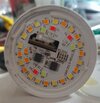 not all the chips are the same, some are low colour temperature and some are high colour temperature, and by varying how much power goes to each it can give a whiter or redder light. The early bulbs before the smart bulb hit the scene would only dim the whiter LED's so it seems as if the bulb is getting redder as it dims, giving an ambiance similar to a tungsten bulb. It seems these were very popular in the USA, but not used so much here.
When the smart bulb hit the scene, and as they came down in price, with GU10 bulbs at around £5, there was not that much of a sale for the bulbs which went redder, so they have disappeared.
 but it is not a com, and the switches need to be wired as master and slaves,
 other makes have different ways to wire them, no longer does one wiring diagram suit all. I don't know if you can get smart dimmer switches? I know we use smart lights in the kitchen, so we can turn them on without putting flour covered fingers on the light switch, on/off and dimming even colour change of counter lights is voice commands.
I have become lazy in my old age, at ½ hour before sunset the living room main lights switch on, and using voice control it does not matter if lights on lighting circuit or plugged in, hey Google turn off living room lights turns them all off.
Wife has got use to automation, it's hey Eric make the coffee. Seems the world has moved on. Our grandchildren will be asking "What's a dimmer switch" they will likely think it's when we get another power cut as the grid can't take the load.
My old kitchen had a 65 watt fluorescent lamp, latter a 24 watt LED tube replaced it, son now has the house, and now 14 GU10 down lights, at 4.2 watt each that's 58.8 watt, are we going backwards?
Looking inside the last bulb to fail on me, a 9 watt TCP
not all the chips are the same, some are low colour temperature and some are high colour temperature, and by varying how much power goes to each it can give a whiter or redder light. The early bulbs before the smart bulb hit the scene would only dim the whiter LED's so it seems as if the bulb is getting redder as it dims, giving an ambiance similar to a tungsten bulb. It seems these were very popular in the USA, but not used so much here.When the smart bulb hit the scene, and as they came down in price, with GU10 bulbs at around £5, there was not that much of a sale for the bulbs which went redder, so they have disappeared.
The S-link is wired similar to the com with these switches,Varilight Multi-Point slave dimmer switches must be used with the Multi-Point master and will not work on their own. Slaves allow 2 way or even 3 way dimming. This means you could dim the same light from multiple locations.
I have become lazy in my old age, at ½ hour before sunset the living room main lights switch on, and using voice control it does not matter if lights on lighting circuit or plugged in, hey Google turn off living room lights turns them all off.
Wife has got use to automation, it's hey Eric make the coffee. Seems the world has moved on. Our grandchildren will be asking "What's a dimmer switch" they will likely think it's when we get another power cut as the grid can't take the load.
My old kitchen had a 65 watt fluorescent lamp, latter a 24 watt LED tube replaced it, son now has the house, and now 14 GU10 down lights, at 4.2 watt each that's 58.8 watt, are we going backwards?

DIYnot Local
Staff member
If you need to find a tradesperson to get your job done, please try our local search below, or if you are doing it yourself you can find suppliers local to you.
Select the supplier or trade you require, enter your location to begin your search.
Please select a service and enter a location to continue...
Are you a trade or supplier? You can create your listing free at DIYnot Local


