• Looking for a smarter way to manage your heating this winter? We’ve been testing the new Aqara Radiator Thermostat W600 to see how quiet, accurate and easy it is to use around the home. Click here read our review.

Help needed setting up CCTV cameras

Joined
7 Sep 2025
Messages
149
Reaction score
1
Country
United Kingdom
Evening!

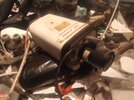
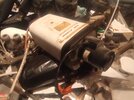
I have a I camera and a Sharp TV. TV modal number LC-26AD5E-BK

Anyone know how to get an image on the screen please?

Thanks
 
What camera is it?

Most CCTV cameras these days are IP based, so you would normally be checking images on a phone or computer.
 
What camera is it?

Most CCTV cameras these days are IP based, so you would normally be checking images on a phone or computer.
It says it is an I camera and that is it!
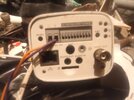
It has an eithernet and a coaxil port on the back f it
 
It says it is an I camera and that is it!
It has an eithernet and a coaxil port on the back f it

Well if it only has the two ports, then you've only two options, an ethernet to ethernet connection or a coax to coax connection. Try using one of those to connect to the TV and see what happens.
 
It's probably an analog camera, so:

Analog CCTV Cameras (CVBS)
  • Use BNC connectors and coaxial cable
  • Connect to TV via a BNC-to-RCA adapter or directly if your TV has a composite input
You would use an aerial lead and go from camera coax port into aerial socket on the TV.
 
It could also be one of 3/4 other formats via a bnc …NOT SUPPORTED by a standard tv video inputs
 
Well if it only has the two ports, then you've only two options, an ethernet to ethernet connection or a coax to coax connection. Try using one of those to connect to the TV and see what happens.
I have connetected it to the TV and nothing! but i dont knw how to opperate the TV either
 
It's probably an analog camera, so:

Analog CCTV Cameras (CVBS)
  • Use BNC connectors and coaxial cable
  • Connect to TV via a BNC-to-RCA adapter or directly if your TV has a composite input
You would use an aerial lead and go from camera coax port into aerial socket on the TV.
Im fairly sure the coaxil port will be analog. Sorry it is a BNC on camera to coaxil port n TV
I dnt know what an RCA adapter or a composite input is though

Yes using aerial lead
 

Attachments

  • IMG_20251105_200129.jpg
    IMG_20251105_200129.jpg
    241.3 KB · Views: 53
  • IMG_20251105_200129.jpg
    IMG_20251105_200129.jpg
    241.3 KB · Views: 48
  • IMG_20251105_200144.jpg
    IMG_20251105_200144.jpg
    207 KB · Views: 50
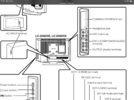
Bnc 5m lead plus a bnc to phono ….then either scart adaptor or plug straight into composite port ( if your tv has one ) normally a yellow phono input , then use tv external input button …
 
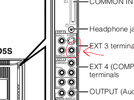
Use ext3 and plug it into this port …
 

Attachments

  • IMG_7197.png
    IMG_7197.png
    508.7 KB · Views: 31
  • IMG_7196.jpeg
    IMG_7196.jpeg
    244.1 KB · Views: 29
Bnc 5m lead plus a bnc to phono ….then either scart adaptor or plug straight into composite port ( if your tv has one ) normally a yellow phono input , then use tv external input button …
So are you saying I need a BNC from the camera to a yellow phono to the TV, instead of a coaxil to the TV instead?
What is the scart adapter for? what is a composite port; is that not the same as a phono?
What is the tv external input button?
 
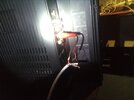
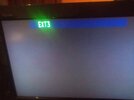
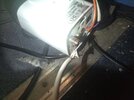
i have wired a cable from the camera to the yellow phonon on extention 3 on the TV and still nothing
 

Attachments

  • IMG_20251107_215728.jpg
    IMG_20251107_215728.jpg
    226.1 KB · Views: 34
  • IMG_20251107_215832 (2).jpg
    IMG_20251107_215832 (2).jpg
    181.3 KB · Views: 31
  • IMG_20251107_215735.jpg
    IMG_20251107_215735.jpg
    225.1 KB · Views: 32

If you need to find a tradesperson to get your job done, please try our local search below, or if you are doing it yourself you can find suppliers local to you.

Select the supplier or trade you require, enter your location to begin your search.


Are you a trade or supplier? You can create your listing free at DIYnot Local

 
Back
Top