• Looking for a smarter way to manage your heating this winter? We’ve been testing the new Aqara Radiator Thermostat W600 to see how quiet, accurate and easy it is to use around the home. Click here read our review.

Alarm Wiring, HELP!

Joined
13 Aug 2025
Messages
6
Reaction score
0
Country
United Kingdom
Hi, long story short.
Burgular Alarm kepad is Gardtec 370, the main unit is also a Gardtec 370 but installed on a sperate floor.
The bell box is a new deltabell. The goal is to connect the new deltabell. The old bell was removed years ago and disposed of. The cabling remains in place.

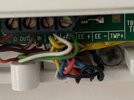
Pic 1 - Main unit wiring
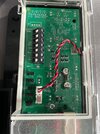
Pic 2 - Keypad Wiring
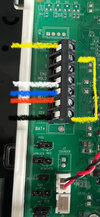
Pic 3 - empty terminals on the new bell box
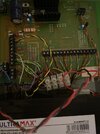
Pic 4 - cable to connect into the bell box still in situ.

Can a kind soul please tell me which colour cables goes into which terminal in Pic 3 (Bell box). EG
Black =
Yellow =
Blue =
Red =
White =

Thank you
 

Attachments
  • PIC 1.jpg
    PIC 1.jpg
    244.8 KB · Views: 47
  • PIC 2.jpg
    PIC 2.jpg
    228.9 KB · Views: 50
  • PIC 3.jpg
    PIC 3.jpg
    356.2 KB · Views: 50
  • PIC 4.jpg
    PIC 4.jpg
    520.6 KB · Views: 45
Last edited:
You might find you don't get an answer to your post here on the DIYnot 'Your Projects' forum. This forum is described as being for:

abcd.jpg


The guys who can help you, normally hang out in the DIYnot - "Alarms, CCTV & Telephones" forum.
 
You might find you don't get an answer to your post here on the DIYnot 'Your Projects' forum. This forum is described as being for:

View attachment 389771

The guys who can help you, normally hang out in the DIYnot - "Alarms, CCTV & Telephones" forum.
Can a mod move it, or should I repost it there?
 
Delta bells don’t ring when you first connect them … only after closing micro switch , then opening it for first time , don’t forget to move the bottom battery link
 
Following on from this, I thought I may have solved my issues. Turns out there was 2 door contacts that have been removed and the wiring cut but not terminated and stuffed into the walls. The wires are too short to terminate. When arming the alarm the system sounds and presents a number "7". I assume this is reference to Zone 7. I can see there are a number of Z1, Z2 etc to Z7 on the main wiring unit (PIC 1). I disconnected z7 from the board and terminated into a block. I then proceeded to remove the wires from each Zone on the board to hopefully identify which PIR's were related to which zones, alas, each PIR stayed active. I now asssume I am removing the comms wiring from the board rather than the PIR power?

Does anyboday have any ideas how I proceed to recomission this system. I assume I have to remove the zone wiring on the board 1 by 1 then rearm each time to establish which zone wiring represnts the abondoned door contacts then terminate them at the board? Pic 1 in the first post in the main unit,
 
Put a link in zone 7 … set system , activate each device one at a time and write down the zone number
 
Put a link in zone 7 … set system , activate each device one at a time and write down the zone number
not sure what you mean by "Link"? I reconnected zone 7 on the board, and disconnected z6, tried arming, and had a cycle of messages. 66, C6, t, 6, 1. Cant seem to find a reference to that cycle of codes in the maunal. any ideas very welcomed.
 
Link=small piece of wire 'linking' the two terminals for zone 7.
Put all wires back in any zones you taken out, put a 'link' in zone 7 terminals-the problem zone, and report back.
 

If you need to find a tradesperson to get your job done, please try our local search below, or if you are doing it yourself you can find suppliers local to you.

Select the supplier or trade you require, enter your location to begin your search.


Are you a trade or supplier? You can create your listing free at DIYnot Local

 
Back
Top