
- Joined
- 27 Jan 2008
- Messages
- 29,563
- Reaction score
- 3,641
- Location
- Llanfair Caereinion, Nr Welshpool
- Country

We will see how good he is, can he tell use what all those readings mean?Eh? Not sure quite what you mean?

We will see how good he is, can he tell use what all those readings mean?Eh? Not sure quite what you mean?

We will see how good he is, can he tell use what all those readings mean?
What pink thing? My meter is not in my main house, to read it need to go outside, down a set of steps, and into the flat under the main house, so rarely look at it. The old meter was easy, and have a separate export meter, never read, but should be able to compare that one to smart meter.Do you now have to upload a photo of your pink thing to be able to use it online?
 well it is not a pre-payment account, so all it says does not apply to me.
 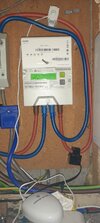 The meter with serial numbers blanked, so just button A and B
 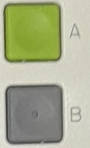 no other buttons. Each time pressed, it scrolls to next reading. But without any instructions, really no idea how to read it. Not really worried as the app tells me what they owe us, but to say easy to read, clearly it is not.
What pink thing?

I read NORMAL reading, I read LOW reading, then I enter on the internet. You seem to think meter reading is rocket science.Eh? Not sure quite what you mean?
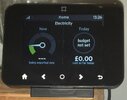 most of the day, what I want is how much am I using now, and how much battery is left, with 40% battery left I can simply put the dishwasher on before going to bed, with 15% left, want to set a timer so switches on after 00:30, so now exporting 1.6 kWh and 99% battery.
I agree completely, the only reason I can come up with is the limited and conjested space between the fuse and meter but it is only a 60A fuse so could have used a bit of 16mm².That is nearly as I would have expected, I would have thought the neutral would use a Henley block, but seems unlikely to make much difference either way, but now it should work as normal, the meter doing the switching.
Glad to hear all now OK, hope every change is not like this, but it was three visits to get my smart meter fitted.Anyway all resolved and thanks to Rodders for pointing out the most obvious.
Mine wasn't smooth and a short time after installation provider requested readings as they couldn't access it but not heard from them since.Glad to hear all now OK, hope every change is not like this, but it was three visits to get my smart meter fitted.

What pink thing?
...on line, via the pink thing.
Do you now have to upload a photo of your pink thing to be able to use it online?
I read NORMAL reading, I read LOW reading, then I enter on the internet. You seem to think meter reading is rocket science.
Mine wasn't smooth and a short time after installation provider requested readings as they couldn't access it but not heard from them since.
Then continuesTo read a Landis+Gyr E470 smart meter, locate the display screen and the "A" and "B" buttons. Press the "A" button to wake up the screen (if necessary) and then press it repeatedly to cycle through the readings. Look for the "TOTAL ACT IMPORT" reading, which represents your current electricity consumption. If you have a two-rate tariff, you can access the different rates by pressing and holding button B to view the tariff display and then pressing A to switch between rates.
Pressing button A does scroll thought many options, includingDetailed Steps:
- 1. Locate the meter and buttons:
The Landis+Gyr E470 smart meter will have a display screen and two buttons, typically labeled "A" and "B".
- 2. Wake up the screen (if needed):
If the screen is blank, press button "A" to activate it.
- 3. Cycle through readings:
Press button "A" repeatedly to navigate through the different display screens.
- 4. Find "TOTAL ACT IMPORT":
The reading you're looking for is typically labeled "TOTAL ACT IMPORT". This is the total amount of electricity you have consumed since the meter was installed.
- 5. For two-rate tariffs:
- Press and hold button "B" to access the tariff display.
- The first screen will show the first rate's reading.
- Press button "A" to switch to the second rate's reading.
- 6. Record the reading:
Write down the numbers displayed in front of "M3" (for gas) or "kWh" (for electricity), ignoring any leading zeros or numbers after the decimal point.
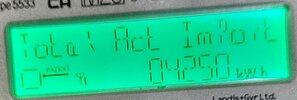
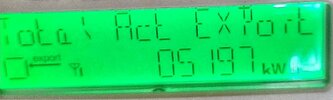 however the button B asks if I want to enter code number, and if I want to delete data, but there is no off-peak that I can find, so same as last time I tried, without knowing peak and off-peak, the meter is a bit useless.
Move house to a place without smart meter.So back to @DiyNutJob you say it is easy, please explain how to work out what is peak and what is off-peak, as I simply can't find it, I will as in wife's name ask her to get the pink thing, but should be able to read from the meter with ease, clearly that is not the case.

If you need to find a tradesperson to get your job done, please try our local search below, or if you are doing it yourself you can find suppliers local to you.
Select the supplier or trade you require, enter your location to begin your search.
Are you a trade or supplier? You can create your listing free at DIYnot Local

