
This system is brand new and has been installed for about a month now, no issues. The ComIP module works perfectly, all the PIRs and keypads etc. The only issue I cant resolve is the SMS feature on the Com2400. I have tried all the TAP providers I can find, I even signed up to OpenTAP. When I perform a test from one of the keypads, it stays on connecting SMS for about a minute, then fails, trys again for another minute and then says SMS failed, then resets the module. The log simply says "ARC 1 Test Call via Com2400 Failed". If I pick up a handset while the test takes place, I can hear it dial the number, then I hear a message from the phone provider telling me to redial the number and try again. If I dial the house phone twice, the Com2400 steps in and I can hear beeping, so it appears to be functioning properly but I am at a complete loss.

You are using an out of date browser. It may not display this or other websites correctly.
You should upgrade or use an alternative browser.
You should upgrade or use an alternative browser.
Texecom Elite 24 Com2400 SMS issue
- Thread starter MilkDawg
- Start date
If you're getting the number wrong, then you'll get the 'number has not been recognised' message. Otherwise, it would just be the MODEM at the answering side.
Beware that if you're using OpenTAP and the number is correct, then you'll be getting charged 50p each time you dial - failed delivery or not.
Beware that if you're using OpenTAP and the number is correct, then you'll be getting charged 50p each time you dial - failed delivery or not.

Only number that works is the voda phone ending 9993 have you got broadband ? Have you fitted a filter ? Apart from this I haven't had any problems unless you haven't enabled digi.

on board dig com 2400
com port 1 if using premier 24 set to com2400
if using elite 24 com port 1 nothing fitted, you should be able to use the com ip on here if its the elite 24.
Digi enabled in digi options,
Your mobile numbers in program digi
check your settings here
protocol sms messaging
your mobile number
reports select appropriately
config, shouldn't need anything on here
Tap service numbers in setup modules/sms centre
not aware of open tap being turned off so would have thought that worked and the vodafone 07785 499993 still works
do you have broadband over the telephone?
com port 1 if using premier 24 set to com2400
if using elite 24 com port 1 nothing fitted, you should be able to use the com ip on here if its the elite 24.
Digi enabled in digi options,
Your mobile numbers in program digi
check your settings here
protocol sms messaging
your mobile number
reports select appropriately
config, shouldn't need anything on here
Tap service numbers in setup modules/sms centre
not aware of open tap being turned off so would have thought that worked and the vodafone 07785 499993 still works
do you have broadband over the telephone?
No ADSL, broadband is Virgin. I have changed the number back to the vodafone one, still no different. Just to check, under ARC, Pri. Tel No: that should be my mobile number, correct? And also the Vodafone number should be placed into SMS Call Centre 1: ? The protocol is set to SMS Messaging too.
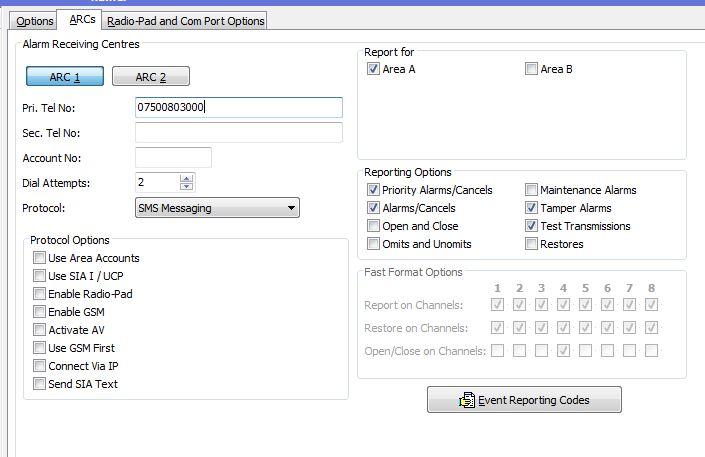
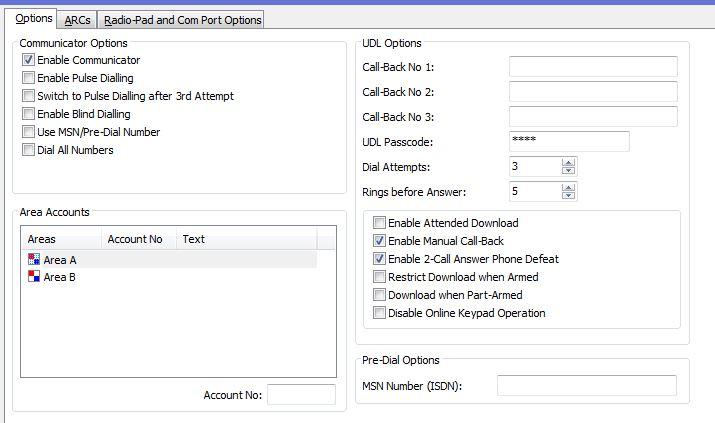
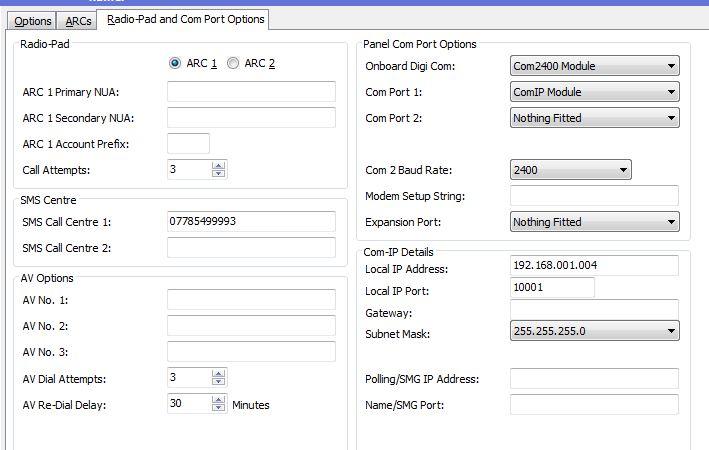
Looks ok , so broadband is via cable ? Yes ? Phone line has no mobile barring on it ? 07 ? Yes , dial the voda service number from your landline do you get modem tones ? Also ring your landline 3 rings and redial does your comms 2400 answer ? Ps take your details out of the screen shots ! 😳[/code]
If you go and do a test call in udl digi options, test call.
It goes through the process at what point does it fail.
so it be dialling, connecting, sms connected.....
also how have you connected the com 240 to the phone line and have you checked that its definetley a com 2400.
It goes through the process at what point does it fail.
so it be dialling, connecting, sms connected.....
also how have you connected the com 240 to the phone line and have you checked that its definetley a com 2400.
Thanks for the details warning but I already changed my number before I captured the screen. Broadband via cable yes. It is wired to the secondary output on the master socket. If I dial my home phone twice, the modem kicks in and I hear beeping etc. I will try and call the vodafone number from my home phone when I get in. I have no blocks on 07 numbers as I can dial my own mobile from the landline. The last thing it does is "SMS Connecting" which sits there for about 60 seconds then fails.
In wintex in global, timers tab to the right you can see modem level.
the values vary from 0 to 7 from memory and adjust for noise setting to 2 or 7 usually helps, but trial and error.
from r and t on com 2400?
the values vary from 0 to 7 from memory and adjust for noise setting to 2 or 7 usually helps, but trial and error.
from r and t on com 2400?
In wintex in global, timers tab to the right you can see modem level.
the values vary from 0 to 7 from memory and adjust for noise setting to 2 or 7 usually helps, but trial and error.
from r and t on com 2400?
the values vary from 0 to 7 from memory and adjust for noise setting to 2 or 7 usually helps, but trial and error.
from r and t on com 2400?
The R and T are not polarity sensitive, but people have been known to connect it to R1 and T1.
The fact the dial tone stage was passed suggests the line is seen but the coms are poor and trying to find that issue is going through everything step by step.
did it just get as far as SMS connecting in the test menu?
Not sure what else I can suggest at this moment without interfacing with the panel.
The fact the dial tone stage was passed suggests the line is seen but the coms are poor and trying to find that issue is going through everything step by step.
did it just get as far as SMS connecting in the test menu?
Not sure what else I can suggest at this moment without interfacing with the panel.

DIYnot Local
Staff member
If you need to find a tradesperson to get your job done, please try our local search below, or if you are doing it yourself you can find suppliers local to you.
Select the supplier or trade you require, enter your location to begin your search.
Please select a service and enter a location to continue...
Are you a trade or supplier? You can create your listing free at DIYnot Local
Similar threads

- Replies
- 35
- Views
- 6K
