• Looking for a smarter way to manage your heating this winter? We’ve been testing the new Aqara Radiator Thermostat W600 to see how quiet, accurate and easy it is to use around the home. Click here read our review.

Texecom Premier 48 bringing up to date?

Just to be aware, you won’t need the flasher programmer after the new panel has the smart com as the firmware can be done online.

However you can use the flasher manually but you would need the elite flasher program downloadable from Texecom website.

The smart com could be used to down load the profile but it’s probably more hassle to do it that way, mainly because the lead for the smart com has two connections one for the smart com component (this provides power to the smart com module also), the other is a data lead and is used for the comip component and this is where you would use wintex to connect via comip and an ip address.
 
Thanks for this information. I won't get the flasher in that case, looking online I'll make my own usb cable following these steps too:


I also won't get the Elite 48, I'll get the 24 as I have 15 zones presently so should be ample. No idea why we went with a 48 originally.
 
Cable arrived, the new equipment will arrive in the next day or so.

I've been looking to download Wintex, on the Texecom site it sends me to sign up to Texecom Cloud which I can't as an end user and don't have a company or vat registered.

I looked to sign up to
https://texecom.websitetoolbox.com/ which I have done but awaiting approval. I am hoping I can find the downloads there, any ideas? Even then, its dependent on if I get approved.

This was meant to be the easy bit!
 
Right, I am trying to connect to my existing panel, Premier 48.

Usb cable connected to com1 on the panel (it has com1 and com2). Drivers installed for the cable and configured on the laptop as com1.

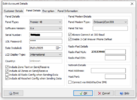
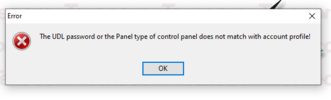
In Wintex I have created an account, selected Premier 48, software version 8.x (as per my keypad), UDL password I have used the engineers code, left everything else as default. When I try to connect using PC-Com(Com1) I get the error The UDL password or the panel type of control panel does not match with account profile!

When I then go to Edit Account > Panel Details I can see it has populated the Serial Number so there is communication. I have tried password 1234 but get the same.

I have no idea if the original alarm fitter used Wintex.

Any suggestions here?

Ta
 

Attachments

  • account_settings.PNG
    account_settings.PNG
    27 KB · Views: 45
  • error.PNG
    error.PNG
    11.4 KB · Views: 60
Hi, thought I would post an update.

New alarm box fitted, was pretty straightforward on the cabling front, copy and paste.

I was able to reference the old Wintex profile to set up the new profile, so bulk of the heavy lifting was already done. I did hit little issues one after the other but was able to resolve them as I went along with the help of past posts on here mainly.

Next I will tackle the SmartComm, not ready up anything on this yet so will do so and report back. I thought I'd use an ethernet cable to connect it to my network but the cable will be visible. I am curious, if the cable was cut would it automatically try connecting over wi-fi? If not, maybe I should just leave it to wi-fi?

Thanks again, has been an interesting project and learnt quite a lot. It really is a beast of a system with so many intricacies.
 

If you need to find a tradesperson to get your job done, please try our local search below, or if you are doing it yourself you can find suppliers local to you.

Select the supplier or trade you require, enter your location to begin your search.


Are you a trade or supplier? You can create your listing free at DIYnot Local

 
Back
Top