• Looking for a smarter way to manage your heating this winter? We’ve been testing the new Aqara Radiator Thermostat W600 to see how quiet, accurate and easy it is to use around the home. Click here read our review.

Texecom Premier Elite 24 - Displays Zones on Keypad when in day mode/default

Joined
5 Sep 2025
Messages
4
Reaction score
0
Country
United Kingdom
Hi folks,

Hopefully someone can help, for the life of me cant work this out. I've recently moved into new prpoerty which has a Texecom Elite 24 system installed.

All is working fine, and the remote access app is working great. On the keypad it has the date and time showing, but when a person walk in front of a sensor and activates it, it shows up on the keypad "Z001 ACTIVE HALL" as an example. Is there a way to disable this from being shown? My understanding is just the date/time is normaly dispayed on the keypad, without the zones flashing up everytime the sensor is activated.

1757083370454.png
 
Thanks @sparkymarka I have tried that, you press chime, it makes a sound, but the zone is still displayed, same if I press it again. It doesn't seem to make a difference.
 
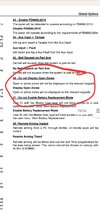
This is probably being caused by this parameter, it can only be altered using the engineering menus.
 

Attachments

  • Screenshot_20250905_175519_Drive.jpg
    Screenshot_20250905_175519_Drive.jpg
    159.7 KB · Views: 32
Thanks @Rulland I'm just an end user, but I do have the engineer code, is this something i could change myself? Is there any step by step instructions you can provide please?
 
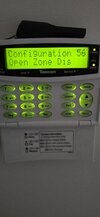
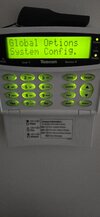
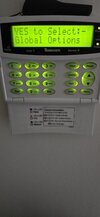
I can, enter the engineer code-it should display 'program zones', press 3, then yes, will take you into 'Global options'.
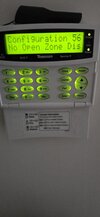
Scroll to 'System config', press enter, type in 56, if you're on 'view open zones' press no, and it should change to no.
Press menu a few times until the display asks if you wish to log out of engineers-press yes.
Hopefully that should just leave date and time etc on the display continuously.
 

Attachments

  • 17570956228573593538114402152835.jpg
    17570956228573593538114402152835.jpg
    173.2 KB · Views: 23
  • 17570956404666047145564867664080.jpg
    17570956404666047145564867664080.jpg
    173.7 KB · Views: 24
  • 17570956662122246259833259281075.jpg
    17570956662122246259833259281075.jpg
    175.1 KB · Views: 28
  • 17570956792951596779608416271018.jpg
    17570956792951596779608416271018.jpg
    178.3 KB · Views: 25
Amazing! That done the trick!

Would never of got they on my own, so thank you very much! It was one of those niggly annoynces! Hopefully this helps anyone in the same situation.

Cheers
 

If you need to find a tradesperson to get your job done, please try our local search below, or if you are doing it yourself you can find suppliers local to you.

Select the supplier or trade you require, enter your location to begin your search.


Are you a trade or supplier? You can create your listing free at DIYnot Local

 
Back
Top