
Texecom Smartcom - Cloud Stopped working

Joined
23 Jul 2007
Messages
15
Reaction score
0
Location
Humberside
Country
United Kingdom
Hi all.

I have a Texecom Elite 64 Live Panel (SW Ver 4.00.24LS1) with a Smartcom module that is about 10 years old everything was working fine up until a few months ago (how long I'm not sure) , when I was greeted with :
System Alerts! : ATS Failed.
On the SmartCom the WiFi light is solid but the Cloud one is flashing.

If you try and connect with the app (v1) you get the following message Server Error - Error Code 3 There was no valid response from the server. An SSL error has occurred and a secure connection to the server cannot be made.

I go to a menu (forgot which) in the panel which also gives the following: Please wait.... Modem online... Start SetupCall Sending IP......... Call Retrying... NO CARRIER

I also can't get in with wintex anymore as it ignores the connection.

Any advice would be most appreciated.

Cheers
Steve
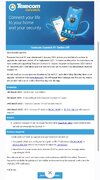
 
You will not get a connection using the V1 app, you should have had numerous emails from Texecom advising you that you need to upgrade to V2.
Pretty sure the V1 app was switched off around March 2025.
 
As below.
 

Attachments

  • Screenshot_20260425_122034_Email.jpg
    Screenshot_20260425_122034_Email.jpg
    284.4 KB · Views: 14
The problem here is the smart com and is that upto date and if an update can be forced through. Going to guess your are going to need a replacement smart com potentially.

However you may be lucky and the smart com may have had an update.

Flash upgrading the panel also and useable.

Do you know what version the smart com is currently at?

You can attempt to change the, Texecom connect protocol address 1 to 127.0.0.251 instead of 55.x.x.x. If your still struggling we can attempt to take a look, but unless the smart com has been updated it is unlikely to work.
 
Hi thanks for the response.

I'm not sure what the SmartCom firmware is. And wouldn't know were to look to find it especially as the app and winter no longer connect. I assume if the app has ever asked me to updated it I would have done but not used the app in an age.

I will have a look into were I need to change the IP address and see if that yields any results.


Thanks
 
the app would tell you if you can log into it.

download the smartcom manual its available online will give you the process (google AI searches give the procedures these days).

once you have the ip address changed you will need to generate an app code
then create a Texecom cloud account and register the panel on there

This if it works will show the panel version and the smartcom version, you may be lucky, if your struggling then you may need to reach out to Texecom tech support. If no joy then if i am free we can look at doing some checks and seeing the state of play is.
 
Hi thanks for the response.
I changed the IP for the Primary number.

However since doing so the current state of play is that the cloud led now continuously flashes and the WiFi light that was previously set solid now comes on for 5 to 10 seconds flashes once and comes on for 5 to 10 seconds again before going off for a bit and repeating.
Needles to say can't create an app code as it's now (I assume) not connecting to the internet or network anymore.

With regards the Wifi connect

My wifi has always been the same router same SSID and same password so in theory the SmartCom shouldn't have issues with the details it originally had so not sure why it has now. And if I take my laptop over to the SmartCom it has full bars with regards wifi signal.

However looking in the manual when you set up the device you would connect to the smartcoms own SSID and proceed to a specific IP address.

However the SmartComs own ssid is not visible so cannot connect to it this way. is this because it already has the details it needs and therefor disables it's own SSID?

What would you advise as my next course of action

Cheers
Steve
 
gove us a call after 10pm but before 10:30pm can go through a few things with you then, just writing some quotes up at the minute
 
well if you had been free like so many other you would have probably let me know and I could of provided the number then, or like so many others they just look me up..

if your free later today let me know
 

If you need to find a tradesperson to get your job done, please try our local search below, or if you are doing it yourself you can find suppliers local to you.

Select the supplier or trade you require, enter your location to begin your search.


Are you a trade or supplier? You can create your listing free at DIYnot Local

 
Back
Top