
My Triton T80 thermostatic electric shower (1) low water pressure (orange display) light is always on, despite there not being low water pressure when testing. The On/Off button is correctly illuminated orange so the wiring is correct. I installed an identical electric shower (2) in the property and (2) works properly. Not sure why (1) low pressure light is always on. What should I do?

You are using an out of date browser. It may not display this or other websites correctly.
You should upgrade or use an alternative browser.
You should upgrade or use an alternative browser.
Thermostatic electric shower low pressure display always on
- Thread starter TryAgain1
- Start date
-
- Tags
- electric error shower warning light

In (at least) some Triton models, water pressure acts on a diaphragm which moves a plunger upwards to actuate a microswitch. If the plunger doesn't quite reach the switch or press it hard enough the switch doesn't operate. The low pressure light then stays on and water heating is disabled.
The shower does heat up properly and reaches adequate outlet temperature as standard just that the low pressure indicator comes on in error. Preciously the 2 5v/12v brown (live) wires that pair together and connect to a LED/diode (that creates the orange light) was not clipped to the holder on the shower enclosure front and in this position worked fine. I think the indicator wire position (e.g. clipped or unclipped) effects the Low Pressure display. Could a clogged inlet filter be a cause? This shower is brand new only been operating for a weekIn (at least) some Triton models, water pressure acts on a diaphragm which moves a plunger upwards to actuate a microswitch. If the plunger doesn't quite reach the switch or press it hard enough the switch doesn't operate. The low pressure light then stays on and water heating is disabled.
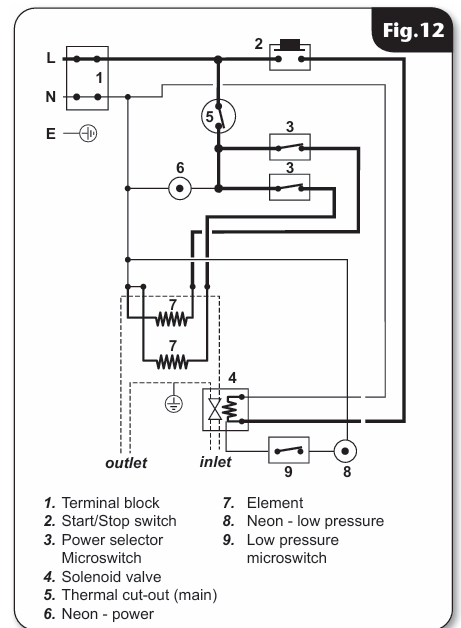
The power indication ON neon (6) has got nothing to do with the Low Pressure neon (8), just ensure the power indicating neon is clipped into its holder every time you replace the shower cover after removing it, it is (permanently) on as soon as you power up the shower with the pull cord (providing the TCO is satisfied).
The Low Pressure, NC (normally closed) pressure switch (9) is electrically supplied once the start button is pressed and should only stay "made" with the low pressure neon illuminated for a few seconds until the pressure/flow builds up in the shower and the water starts heating. If the shower is operating normally then looks like a faulty pressure switch or the like.
EDIT: It's also possible, as suggested by @Alec_t, that the switch is diaphragm operated with a pushrod like the main microswitches, have a look if possible and post a photo.
You might also, as a test, reduce the power to Eco setting, one element only, switch on the shower and keep turning the temperature control very slowly clockwise to hotter to see if the low pressure neon extinguishes.
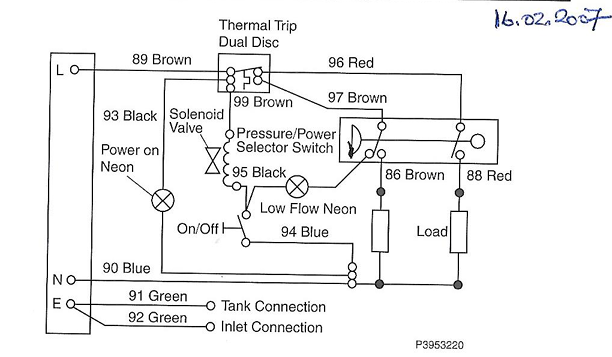
The Mira Sport low pressure neon had a much better set up, the economy microswitch had/has two sets of contacts, one, NO set, close to heat one set of elements when the pressure/flow builds up on pressing the start button, the other, NC set then opens and the low pressure neon extinguishes.
The (my) Triton T80Z Fast fit has a horrible mechanical "semaphore" type red (lollipop stick) flag that shows in a window until the main pressure switch diaphragm rises to close the microswitches, it then disappears from view!!.., if you can (not) see it through the "rain".
Triton Thermostatic
Mira Sport
The Low Pressure, NC (normally closed) pressure switch (9) is electrically supplied once the start button is pressed and should only stay "made" with the low pressure neon illuminated for a few seconds until the pressure/flow builds up in the shower and the water starts heating. If the shower is operating normally then looks like a faulty pressure switch or the like.
EDIT: It's also possible, as suggested by @Alec_t, that the switch is diaphragm operated with a pushrod like the main microswitches, have a look if possible and post a photo.
You might also, as a test, reduce the power to Eco setting, one element only, switch on the shower and keep turning the temperature control very slowly clockwise to hotter to see if the low pressure neon extinguishes.
The Mira Sport low pressure neon had a much better set up, the economy microswitch had/has two sets of contacts, one, NO set, close to heat one set of elements when the pressure/flow builds up on pressing the start button, the other, NC set then opens and the low pressure neon extinguishes.
The (my) Triton T80Z Fast fit has a horrible mechanical "semaphore" type red (lollipop stick) flag that shows in a window until the main pressure switch diaphragm rises to close the microswitches, it then disappears from view!!.., if you can (not) see it through the "rain".
Triton Thermostatic
Mira Sport
Last edited:
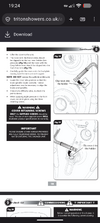
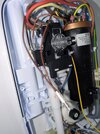
The 2 brown wires clip into the top holder behind 'low pressure' and yellow/grey behind the On/Off button on lower holder. Left screenshot is from installation manual screenshot to right is a PUC of the shower back enclosure.
Attachments
I turned said showed on starting on Eco (1 blue line) mode turning the heat up slowly to 1 red line then 2 red lines. The 'low pressure' display was on the while time but the shower temperature increased properly.The power indication ON neon (6) has got nothing to do with the Low Pressure neon (8), just ensure the power indicating neon is clipped into its holder every time you replace the shower cover after removing it, it is (permanently) on as soon as you power up the shower with the pull cord (providing the TCO is satisfied).
The Low Pressure, NC (normally closed) pressure switch (9) is electrically supplied once the start button is pressed and should only stay "made" with the low pressure neon illuminated for a few seconds until the pressure/flow builds up in the shower and the water starts heating. If the shower is operating normally then looks like a faulty pressure switch or the like.
EDIT: It's also possible, as suggested by @Alec_t, that the switch is diaphragm operated with a pushrod like the main microswitches, have a look if possible and post a photo.
You might also, as a test, reduce the power to Eco setting, one element only, switch on the shower and keep turning the temperature control very slowly clockwise to hotter to see if the low pressure neon extinguishes.
The Mira Sport low pressure neon had a much better set up, the economy microswitch had/has two sets of contacts, one, NO set, close to heat one set of elements when the pressure/flow builds up on pressing the start button, the other, NC set then opens and the low pressure neon extinguishes.
The (my) Triton T80Z Fast fit has a horrible mechanical "semaphore" type red (lollipop stick) flag that shows in a window until the main pressure switch diaphragm rises to close the microswitches, it then disappears from view!!.., if you can (not) see it through the "rain".
Triton Thermostatic
View attachment 422802
Mira Sport
View attachment 422801
Do you need a pic of the shower parts to tell if the switch is diaphragm operated? The manual (https://www.tritonshowers.co.uk/amfile/file/download/file/319/product/2625/) does not sayThe power indication ON neon (6) has got nothing to do with the Low Pressure neon (8), just ensure the power indicating neon is clipped into its holder every time you replace the shower cover after removing it, it is (permanently) on as soon as you power up the shower with the pull cord (providing the TCO is satisfied).
The Low Pressure, NC (normally closed) pressure switch (9) is electrically supplied once the start button is pressed and should only stay "made" with the low pressure neon illuminated for a few seconds until the pressure/flow builds up in the shower and the water starts heating. If the shower is operating normally then looks like a faulty pressure switch or the like.
EDIT: It's also possible, as suggested by @Alec_t, that the switch is diaphragm operated with a pushrod like the main microswitches, have a look if possible and post a photo.
You might also, as a test, reduce the power to Eco setting, one element only, switch on the shower and keep turning the temperature control very slowly clockwise to hotter to see if the low pressure neon extinguishes.
The Mira Sport low pressure neon had a much better set up, the economy microswitch had/has two sets of contacts, one, NO set, close to heat one set of elements when the pressure/flow builds up on pressing the start button, the other, NC set then opens and the low pressure neon extinguishes.
The (my) Triton T80Z Fast fit has a horrible mechanical "semaphore" type red (lollipop stick) flag that shows in a window until the main pressure switch diaphragm rises to close the microswitches, it then disappears from view!!.., if you can (not) see it through the "rain".
Triton Thermostatic
View attachment 422802
Mira Sport
View attachment 422801
Last edited:
The Top Control is for selecting Cold,(no heating element on, 3 oclock and presently shown position), ECO,(one heating element on, 6 oclock position) and Full Power,(two heating elements on, 9 oclock position).I turned said showed on starting on Eco (1 blue line) mode turning the heat up slowly to 1 red line then 2 red lines. The 'low pressure' display was on the while time but the shower temperature increased properly.
Turn this control to ECO,(one heating element on, 6 oclock position) and leave it (for the test) in this position).
The Bottom control is for (thermostatic) temperature control, and is presently in the 12 oclock position, press the shower start button, then turn this control slowly in a clockwise direction, the temperature should increase, watch for the low power neon extinguishing, keep turning the control clockwise until it comes to a stop, probably around 4.30/5 oclock position, water should be at its hottest, if low pressure neon is still on then faulty, contact Triton.
Simply put, without any of the rigmarole above, once you are getting hot/lukewarm water with either the ECO or Full Power setting selected then this low pressure neon should not "be lit", it should, as stated above, light up for a few seconds when the start/stop button is pressed and then extinguish a few seconds later.
I would also suggest that sometime you turn the power switch to cold (no heating element), then turn the temperature switch anti clockwise to it's fully cold stop at ~ 6 or 7 oclock, start the shower, get a container/bucket and hold it under the shower head (with the shower head in its holder) for exactly 15 seconds, measure this with a 1 litre container, then X 4 to get the shower max flowrate in LPM (litres/min).
Last edited:
I did the test (Top Control at 1 heat element) then thermostatic dial starting at 12 o'clock then moving down to 5 O'Clock. The low pressure light still shows on startup and does not turn off. Would cleaning the shower inlet filter and the flexible hose make a difference?The Top Control is for selecting Cold,(no heating element on, 3 oclock and presently shown position), ECO,(one heating element on, 6 oclock position) and Full Power,(two heating elements on, 9 oclock position).
Turn this control to ECO,(one heating element on, 6 oclock position) and leave it (for the test) in this position).
The Bottom control is for (thermostatic) temperature control, and is presently in the 12 oclock position, press the shower start button, then turn this control slowly in a clockwise direction, the temperature should increase, watch for the low power neon extinguishing, keep turning the control clockwise until it comes to a stop, probably around 4.30/5 oclock position, water should be at its hottest, if low pressure neon is still on then faulty, contact Triton.
Simply put, without any of the rigmarole above, once you are getting hot/lukewarm water with either the ECO or Full Power setting selected then this low pressure neon should not "be lit", it should, as stated above, light up for a few seconds when the start/stop button is pressed and then extinguish a few seconds later.
View attachment 422875
No, If the water is hot then the pressure must be OK otherwise the microswitches which supply power to the heating elements will not close, the low pressure switch is, more than likely, switched by the (same) diaphragm that closes those two microswitches.
Triton charge £99 callout if the fault is not to do with the showerNo, If the water is hot then the pressure must be OK otherwise the microswitches which supply power to the heating elements will not close, the low pressure switch is, more than likely, switched by the (same) diaphragm that closes those two microswitches.
Triton charge £99 callout if the fault is not to do with the shower
Of course they will, especially since the cover has been removed since installation and even if the fault was there before installing it.
If you are quite happy with the shower's performance, then maybe just put a a bit of tape over the low pressure neon and motor on.
Identify the low pressure microswitch, it may be the one in your photo above, remove (with shower isolated) the wires from both terminals and you should get continuity across the terminals with the M.Meter set to resistance, Ohms, because the switch is or should be NC (normally closed), the one shown is a NO one.
You might be able to push the "switch" (shown above Honeywell on this one) in/out with something to see if the M.meter reading changes.
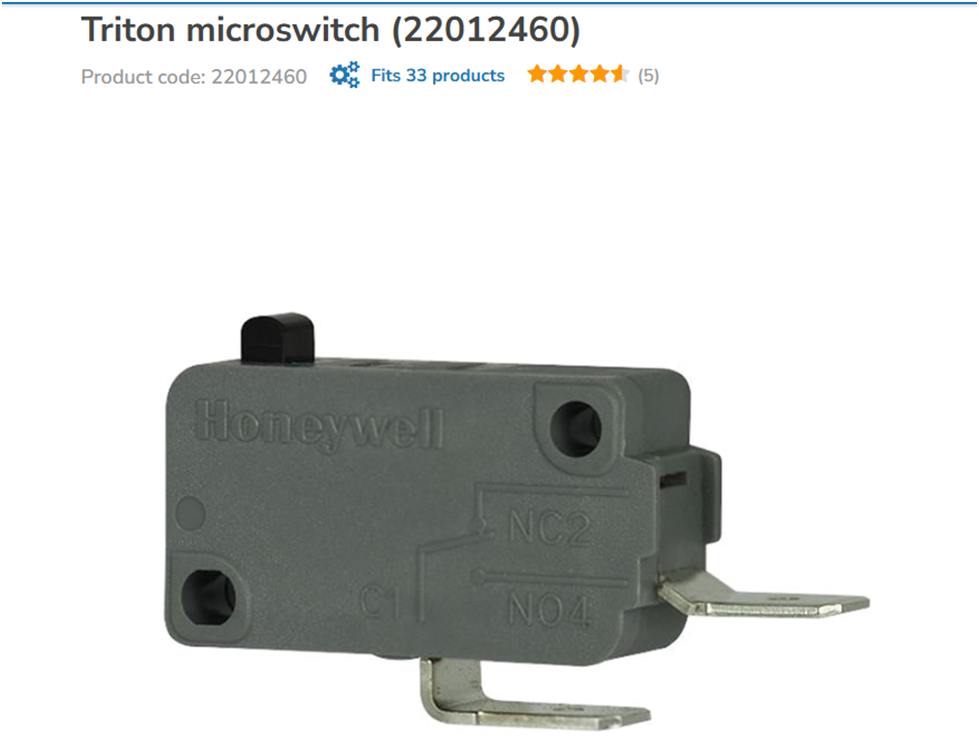
You might be able to push the "switch" (shown above Honeywell on this one) in/out with something to see if the M.meter reading changes.
Last edited:

DIYnot Local
Staff member
If you need to find a tradesperson to get your job done, please try our local search below, or if you are doing it yourself you can find suppliers local to you.
Select the supplier or trade you require, enter your location to begin your search.
Please select a service and enter a location to continue...
Are you a trade or supplier? You can create your listing free at DIYnot Local
Similar threads
- Replies
- 1
- Views
- 19K
- Replies
- 4
- Views
- 2K
