Pyronix Enforcer - Tamper Error /Admin password reset?

Joined
9 Oct 2009
Messages
49
Reaction score
4
Location
Bristol
Country
United Kingdom
Hi All,

So I have a Pyronix enforcer (with the WiFi module) fitted around 2022. Albeit I don't know who by, as we bought the house in 2024.

I changed all the shock sensor batteries a few months ago and one PIR that was flagging as low, but not any of the other contact sensors or PIRs.

Yesterday it started flagging "utility dt wireless low battery", so I went and changed the PIR first as I know DT is in the part number for this, and then the contact sensor (as this is the only other sensor in that room which hasn't been changed). This didn't turn off the low battery warning either.

However I am now left with the original fault and also "utility door mc tamper on input" plus "16 utility door tamper on input". So clearly it wasn't either of those and is mislabelled but unlike before with the shock sensors I don't seem able to clear the tamper alerts.

Q1 - Is this because I still have the low battery on "utility DT" ?
Q2 - Is it also fair to say that the Utility DT is likely a PIR and probably just worth me finding all other PIRs and changing those batteries?
Q3 - What would your approach to clearing these errors be? I have heard about powering down/up the panel, but how do you do this when there is a spare battery in it for power cuts, do you need to open both the master panel (under the stairs for me) and also the front door panel?
Q4 - Longer term....I have the master manager code and can add/remove users e.t.c but I don't have the admin code. I understand there are ways of resetting the admin code to default, or generating 'anti codes'....any help would be appreciated in how I go about that.

Thanks !
 
Q1 - no, this is because you’ve taken the lid off the door contact and it hasn’t been put back fully/completely

Q2 - yes utility DT would indicate a dual technology movement sensor in the Utility.

Q3- clear the faults by rectifying them, make sure the door contact lid is closed completely depressing the tamper switch inside and also change the batteries in your sensor

Q4 - you can default the engineer codes on an enforcer depends on your capability and confidence though, have you tried the default engineer code? 1111
 
Thanks T1GERIII both the cover on the door contact and the PIR are back on and secured back by screw (along with their respective new batteries). I might take another look at these tomorrow, but it does seem odd that they both are flagging as tamper rather than low battery, then there is the original DT which clearly isn't in the utility as labelled and I need to find where it really is and get that battery changed.

I have tried 1111, 2222, 9999

I have wired in Nests, soldered motherboards/PCBs...so pretty confident.

Would you be able to share details here or by DM?
 
Post picture of device in utility ..
Hi sparkymarka

So these are the three devices in the utility.

The battery in the shock that I changed a few months ago.

The PIR (2x varta CR123) and the door contact sensor one varta CR123 (black one hiding at the top left) are pictured below. Can send close ups if if that helps.
 

Attachments

  • PXL_20250127_194108324.MP~2.jpg
    PXL_20250127_194108324.MP~2.jpg
    89.8 KB · Views: 69
  • PXL_20250127_194055654.MP.jpg
    PXL_20250127_194055654.MP.jpg
    43.4 KB · Views: 67
  • PXL_20250127_194039122.MP.jpg
    PXL_20250127_194039122.MP.jpg
    42.6 KB · Views: 69
I can only see ….a detector thats upside down
And a nano style device which doesn’t take the cr123a
 
Why is the sensor upside down …?
I think because the installer decided that would cover the glass if anyone came through it or presumably if they got up there and started looking through that window.

It does seem they were "creative" as they also strapped a PIR into the car footwell of the previous owners car, so it was linked to the house alarm when parked outside.
 
Last edited:
I can only see ….a detector thats upside down
And a nano style device which doesn’t take the cr123
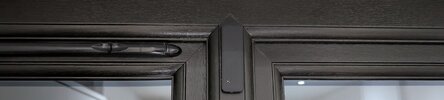
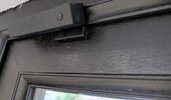
If you look at the top left of the door, you will see the door contact sensor, it's black so not easy to see.

edit: I took a photo this morning.
 

Attachments

  • WhatsApp Image 2025-01-28 at 09.50.41.jpeg
    WhatsApp Image 2025-01-28 at 09.50.41.jpeg
    158.8 KB · Views: 58
Last edited:
I’ll DM you,

I’d be concerned that if that contact is still in tamper it’s the rear tamper that’s causing it I would take the board out and test by the panel holding both the front and rear tamper.
May be that the rear tamper plate was over tightened and subsequently broken loose
 
If you look at the top left of the door, you will see the door contact sensor, it's black so not easy to see.

edit: I took a photo this morning.
Thank you, I will check that.

As I only saw the front tamper and when I clicked that, the lights reacted.

It's odd, it's still holding the PIR tamper fault as well. I was wondering if the tampers don't clear until that "DT low battery" warning is resolved, I just need the time to go up on ladders to change the remaining 2x DT PIR's which aren't in the utility.
 
An update:
1) I found the "Utility" DT sensor with low battery and that code has cleared following a new battery being installed
2) I tested the tamper on the magnetic sensor and it doesn't seem to be the tamper as the light goes off when both tampers are pushed in. So I am thinking it isn't sending back a message to the panel to tell it that the tamper is resolved, and there is a solid red light that stays on.
 
Last edited:
The red light signifys that the reed switch is open. If u put it next to the magnet it should go green. Can the fault on the keypad be reset when both tamper switches pressed?
 
The red light signifys that the reed switch is open. If u put it next to the magnet it should go green. Can the fault on the keypad be reset when both tamper switches pressed?

It stays red (1st led) regardless of the door being open/close however the third led at the end goes green or off when away/near the magnet .

It doesn't reset with both tamper's pushed in
 
It looks like it could be a shock/magnetic contact combined sensor, on whoch case the red would indicate the shock sensor. This doesn't help with the tamper fault though. Can u post a picture of the pcb?
 

If you need to find a tradesperson to get your job done, please try our local search below, or if you are doing it yourself you can find suppliers local to you.

Select the supplier or trade you require, enter your location to begin your search.


Are you a trade or supplier? You can create your listing free at DIYnot Local

 
Back
Top