• Looking for a smarter way to manage your heating this winter? We’ve been testing the new Aqara Radiator Thermostat W600 to see how quiet, accurate and easy it is to use around the home. Click here read our review.

TV cable help

Joined
8 May 2025
Messages
6
Reaction score
0
Country
United Kingdom
Hi guys, I am planning to have a wall mounted structure in the living room and there are two sets of TV cables coming through the wall...my plan is to extend them to the centre of the wall...but I am not sure if I need both...any help to understand better what these cables are for and if I need both???...thanks

See some photos below
 

Attachments

  • IMG_20250508_164825.jpg
    IMG_20250508_164825.jpg
    143.6 KB · Views: 128
  • IMG_20250508_164702.jpg
    IMG_20250508_164702.jpg
    117.7 KB · Views: 115
  • IMG_20250508_164644.jpg
    IMG_20250508_164644.jpg
    203.6 KB · Views: 117
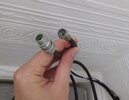
The f plug (screw type) is cable tv or satellite.
The push sort is standard aerial on roof.

How do you get TV signal now?

TVs now just need a power supply as everything can be sent over WiFi. That's the way it's going
 
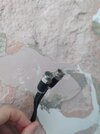
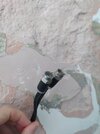
Hi Wayners, thanks for your reply.I just moved in a new house so there are ongoing works...so since I am planning to have the TV structure installed in the middle of the wall...I was wondering if I need any of those cables or not in the future ...in the first photo both cables I am holding come from the same hole...plus there is another hole where the other two cables coming out which you can see from the second photo
 
Moreover why there are so many cables coming through the wall ???do you have any idea???
 
Freeview is one
Cable another
Might have old satellite not used.

Then you might have one going out and to another room.
 
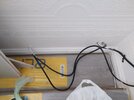
So if I understood well...this one should be the Freeview...
 

Attachments

  • IMG_20250508_175809.jpg
    IMG_20250508_175809.jpg
    115.9 KB · Views: 80
These two instead should be an old satellite
 

Attachments

  • IMG_20250508_164702.jpg
    IMG_20250508_164702.jpg
    117.7 KB · Views: 85
For Sky, Virgin or BT...do I need any of these cables eventually?
No.
New installs for Sky are provided via the Internet, no dish required. The older SkyQ product from a dish is supposedly still available if people want it, but that will likely need a new dish and cabling anyway.
BT and other providers are all internet delivered, no cables needed.
Virgin install their own cables and box, so what you have is no use to them.
 
WiFi is the worst possible way to deliver streaming to anything. Especially in congested housing areas. Too many other users will cause issues. Probably.

Fit a suitably large conduit or cable duct to run CatN ethernet cable from the router modem, plus space to pull through as many other cables as you may want in the future (for gaming device hdmis as one example).

Broadcast satellite and UHF TV signals are with us for a good time yet and the cable is peanuts. Not all the broadcast TV channels support streaming in a convenient wrapper such as the Freeview, Freesat and $ky EPGs do.
 
Your cables in image ending 702 are most likely professionally installed cables for a satellite dish feed.

The plug in image ending 809 is a standard TV coax plug, but that doesn't mean to say it's attached to a roof/loft aerial. With a back-to-back adapter, this could have connected to a socket on a Sky+/Sky+HD box to feed Sky over RF to another TV in a different part of the house.

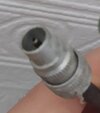
The screw on (F-type) plug in image ending 825 is used for satellite or cable connections, but it's unlikely to be for Virgin cable. This is a screw-on fitting to the cable. Virgin's installers use compression plugs that are a permanent attachment like the Sky plug ends. This could be the connection for a masthead power supply for the TV aerial. It's common for homeowners to mistake this for a setback booster, so they take it with them when they move out.

The simplest thing to do is to go look see if you have a TV aerial on the property or in the loft. If there's a box attached to the mast or nearby in the loft then this could be a powered splitter. If so, it's possible that the single coax with the screw-on F plug is the TV aerial feed. You won't get a signal without replacing the 12V power supply and fitting a new coax lead from it to a TV.

Alternatively, your coax plug could be the TV aerial signal. Just get a telly in the room and plug it in. You won't break anything. Try tuning and see if you get reception.

If there's another room in the house with a TV coax appearing out of the wall, try the TV connection and tuning thing first. If you get a signal, great, you'll know that works. If there's nothing, then you could try shorting the centre pin to the outer ring, then take a small meter set to continuity and test whether either the coax or single F plug give you tone.

If none of this made sense, pay a professional to do the work.

Good luck.

 
WiFi is the worst possible way to deliver streaming to anything. Especially in congested housing areas. Too many other users will cause issues. Probably.

Fit a suitably large conduit or cable duct to run CatN ethernet cable from the router modem, plus space to pull through as many other cables as you may want in the future (for gaming device hdmis as one example).

Broadcast satellite and UHF TV signals are with us for a good time yet and the cable is peanuts. Not all the broadcast TV channels support streaming in a convenient wrapper such as the Freeview, Freesat and $ky EPGs do.
Have streamed programs over Wi-Fi for years without issue .
 
Have streamed programs over Wi-Fi for years without issue .
Everyone's mileage varies.

Wi-Fi quality is hugely variable. The structure of the building. The position of the router. The quality of the router. Wireless congestion. Range. Number of users. The list goes on and one.

A bit of cable. It mostly works, and often superbly despite some homeowners' attempts to sabotage it with ham-fisted or cheap DIY. If there is an issue, it's often traced back to some device hanging off the end of the cable or there's some physical damage. The service through 'that bit of wire' is remarkably robust.
 
Last edited:
with ham-fisted or cheap DIY. If there is an issue, it's often traced back to some device hanging off the end of the cable or there's some physical damage.

Same applies to wi-fi.
 

If you need to find a tradesperson to get your job done, please try our local search below, or if you are doing it yourself you can find suppliers local to you.

Select the supplier or trade you require, enter your location to begin your search.


Are you a trade or supplier? You can create your listing free at DIYnot Local

 
Back
Top