• Looking for a smarter way to manage your heating this winter? We’ve been testing the new Aqara Radiator Thermostat W600 to see how quiet, accurate and easy it is to use around the home. Click here read our review.

Help needed setting up CCTV cameras

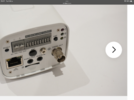
Ok from what I can see the output is standard PAL composite output , to be honest this is an ip camera it looks a good spec …but it may need resetting …whybthe video out isn’t working is ? Bad connections at your end …software issues in the camera or it’s faulty anybody’s guess , try to connect via a pc …
 

Attachments

  • IMG_7204.png
    IMG_7204.png
    1.4 MB · Views: 28
  • IMG_7206.png
    IMG_7206.png
    1 MB · Views: 26
  • IMG_7207.png
    IMG_7207.png
    1.1 MB · Views: 28
Ok from what I can see the output is standard PAL composite output
What is a PAL

, to be honest this is an ip camera it looks a good spec …but it may need resetting …
There is a reset button on the back that i have pressed

whybthe video out isn’t working is ? Bad connections at your end …software issues in the camera or it’s faulty anybody’s guess ,
I dont know where to buy a proper connector for it from

try to connect via a pc …
Do you mean the eithernet cable?
 
Throw it away (recycle it) and get yourself a more modern IP camera.
Then your much more likely to be able to see it on your tv.

Google can then tell you how to set it up.
 
Throw it away (recycle it) and get yourself a more modern IP camera.
Then your much more likely to be able to see it on your tv.

Google can then tell you how to set it up.
That makes no sense …how is a more modern ip camera more likely to work on a modern Tv
 
That makes no sense …how is a more modern ip camera more likely to work on a modern Tv
IP cameras can be seen over the network yes?

I have not watched this but a simple google search brings it up:
Smart TV's can have apps installed.
 
Muckington, I have only taken a cursory look at this, but:

A PAL composite output is an analog video signal format that combines color and brightness information into a single channel, using the PAL standard for encoding.

If you are outputting PAL composite video from the camera, then you probably need a BNC to phono cable, and that connects to the yellow phono socket on your TV. You then need to set the source of the TV to the phono socket.

Also, the wiring you've used looks a right state so I'm not sure that will work. Also, how do you know the camera works?
 
You can order them online, but check this is actually what you need, as I only took a very quick look at your issue.
I take it you didn’t bother to read all the thread ?
It’s allready been said and it looks like the poster has allready bodged up a lead to connect it !
 
I take it you didn’t bother to read all the thread ?
It’s allready been said and it looks like the poster has allready bodged up a lead to connect it !

I read the thread, I was answering his question, but it is perhaps stating the obvious!! (y)
 
If you want a BNC to phono cable, I would imagine that the 1-2m long ones will not be of any use to you.
In that case you may be better using the appropriate coax with a BNC plug fitted one end and a phono plug the other.
All are available via amazon.
 
So are you saying I need a BNC from the camera to a yellow phono to the TV, instead of a coaxil to the TV instead?

The BNC socket, might be an old type network connection, rather than the 1v peak to peak signal you need, to feed the phono socket on a TV. The BNC socket being for a network connection, is further confirmed, by the modern LAN socket, I think I can see in your photo. The BNC is a 10 base T socket. The more modern LAN socket, is the one on the lower left, looking at your photo of the rear of the camera.

The scart socket on your TV, is basically the same as the yellow phono socket, except the phonos are combined into a multi-plug.

[EDIT] and a correction. The BNC is (looking at Sparky's better photo) obviously a PAL output, which should work with a yellow phono input to an older TV, or a SCART.

The socket on the lower left, is clearly marked as a LAN connection, so probably would allow it to be plugged into a router, and the video watched via a web browser.
 
Last edited:

If you need to find a tradesperson to get your job done, please try our local search below, or if you are doing it yourself you can find suppliers local to you.

Select the supplier or trade you require, enter your location to begin your search.


Are you a trade or supplier? You can create your listing free at DIYnot Local
 
Back
Top