Hi,
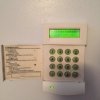
I not long moved into a house that has a couple of Initial boxes mounted on the front and rear of the house, with PIR sensors around the house, and what I believe to be a Honywell Galaxy keypad mounted to the wall with the main box of tricks located in the garage.
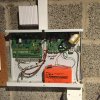
We had a power cut over the weekend which meant that one of the Initial boxes started flashing and when trying to enter either of the two codes we were given by the previous occupant it said there was an error and the siren started going off. I then opened up the main panel and found the engineer code scribbled in there and tried entering that (the lid of the panel was off while doing this) but this didn't work either. The only way I could silence the alarm was to unplug one of the plastic plug connectors within the panel. The keypad now displays a line of flashing asterisks.
I spoke to an alarm company this morning and they said I needed to go back to the original installer which is a little ingenious since it was installed years ago by previous occupants with no associated paperwork.
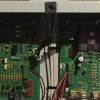
With that said is there anything I can do to salvage what I have or do I need to simply get a new alarm system? I have attached some pictures of the current state and would welcome any guidance.
Many thanks,
Chris
I not long moved into a house that has a couple of Initial boxes mounted on the front and rear of the house, with PIR sensors around the house, and what I believe to be a Honywell Galaxy keypad mounted to the wall with the main box of tricks located in the garage.
We had a power cut over the weekend which meant that one of the Initial boxes started flashing and when trying to enter either of the two codes we were given by the previous occupant it said there was an error and the siren started going off. I then opened up the main panel and found the engineer code scribbled in there and tried entering that (the lid of the panel was off while doing this) but this didn't work either. The only way I could silence the alarm was to unplug one of the plastic plug connectors within the panel. The keypad now displays a line of flashing asterisks.
I spoke to an alarm company this morning and they said I needed to go back to the original installer which is a little ingenious since it was installed years ago by previous occupants with no associated paperwork.
With that said is there anything I can do to salvage what I have or do I need to simply get a new alarm system? I have attached some pictures of the current state and would welcome any guidance.
Many thanks,
Chris