
Hi Echo & D_Hailsham, well water & heating working again, but still have a problem, the room stat works fine small blue light comes on with heat, goes off when temperature reached, but if I turn the heating off at the programmer a (flomasta two-channel programmer model 25902X the blue light on the room stat glimmers, so wiring is still wrong with the stat. The room stat is a ESi model ESRTE/VF. N L with a loop to 1 2 not used 3 to who knows where. At the moment N neg to 2 in connection box L to 4 3 to 5. I will keep trying, but any help would be appreciated.

You are using an out of date browser. It may not display this or other websites correctly.
You should upgrade or use an alternative browser.
You should upgrade or use an alternative browser.
programer wiring
- Thread starter reg7
- Start date

The light flickering will likely be because of the components in the mid position valve. I can't find your thermostat model can you post a link to the installation manual? or some photos? From your description it sounds like this thermostat needs a permanent supply, normal thermostat wiring won't be able to accommodate this as there will not usually be enough wires available. If this is the case you need 4 wires + earth.
N (neutral)
L (permanent live)
Common (from programmer heating on)
Normally Open (to white of valve)
Normally Closed (not used)
N (neutral)
L (permanent live)
Common (from programmer heating on)
Normally Open (to white of valve)
Normally Closed (not used)
Hi Echo, thanks for your help, the light is not flickering its slightly glimmering, shows more in the dark, when on normal it's bright. I will send some photo's tomorrow of the stat front and back. I have had trouble finding installation details on it, I emailed ESi here are the messages. Hi Kevin, thank you very much for your help and the diagram. Can I be a pest and ask one more question. Everything is working fine but, I fitted an ESI 3 port mid position valve, works fine. I fitted an ESI room stat model ES-RTE/VF that works fine small blue light comes on with heat goes off when temperature reached, but if I turn the heating off at the programmer a (flomasta two-channel programmer model 25902X the blue light on the room stat glimmers. I have checked all the wiring to the “Y” plan all correct. I am now wondering if the room stat is now faulty ??. Can you help please. Reply The only time I have seen this before was when the Live and Neutral supplies were reversed. If the Programmer is off there can be no live supply to the Thermostat, probably worth checking the Live and Neutral connections. My reply Hi Kevin, thank you for the quick reply, I have checked the wires to the room stat, blue negative from N in stat back plate to all the negatives in the wiring centre number 2. L has a loop to number 1 in the back plate Brown is in number 1 to number 4 in the wiring centre nothing in number 2 and a black wire from number 3 to number 5 in the wiring centre. Still got a glimmering blue light. Sorry to be such a pain. Reply As you will appreciate it is difficult to diagnose these things at a distance. I still suspect there is a wiring issue, as I mentioned when the Programmer is off there should be no live supply to the Thermostat (therefore no power to illuminate the Neon. So, I suspect there is a back-feed on the Neutral. Have you checked for a Voltage across the Neutral to Earth? Or when disconnected from the Switch Live to Earth? . Hope these will make more sense to you than they did to me.
I need photos, terminal numbers don't mean much.
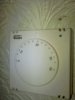
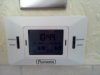
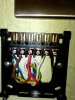
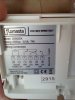
As Echo has said earlier, the thermostat is wired incorrectly; you need four wires, not three.
L and N must be supplied from a permanent supply, e.g the L and N terminals of the Flomasta programmer or the L and N termnals in the wiring junction box.
1 should be connected to Flomasta terminal 4
3 should be connected to valve white.
As currently wired L is supplied from a switched supply, Flomasta terminal 4, which is only live when CH is turned on at the Flomasta.
The dim light is caused by a back-feed from the valve white, stat terminal 3 and stat terminal 1. If you turn the room stat right down, opening the switch in the stat, the blue light should go out.
L and N must be supplied from a permanent supply, e.g the L and N terminals of the Flomasta programmer or the L and N termnals in the wiring junction box.
1 should be connected to Flomasta terminal 4
3 should be connected to valve white.
As currently wired L is supplied from a switched supply, Flomasta terminal 4, which is only live when CH is turned on at the Flomasta.
The dim light is caused by a back-feed from the valve white, stat terminal 3 and stat terminal 1. If you turn the room stat right down, opening the switch in the stat, the blue light should go out.
Hi D_Hailsham, thanks for that. I had 4 wire's on the old stat but cut one out as the tech department of ESi said I would only need 3. Just show's their not always right. Some wiring to sort over the weekend I will let you know the outcome.
Hi D_Hailsham & Echo, before I start can you tell me should the link wire from LIVE to Number 1 be left in place . Cheers.
No, the link must be removed or the programmer will have no control of the heating. The link is also currently causing the electronics to be backfed from the 3 port valve and making the light glow when the heating is off. This wouldn't happen on an S plan, and the thermostat would work properly with the wiring you have now but for Y pan you need 4 wires (+earth) for it to work correctly. A 5 core flex is often used now for this purpose.
P.S. It's never a good idea to cut off unused wires, someone might need them in the future! They should be terminated in a connector block or similar and tucked safely out of the way.
P.S. It's never a good idea to cut off unused wires, someone might need them in the future! They should be terminated in a connector block or similar and tucked safely out of the way.
Hi Echo & D_Hailsham, GREAT IT WORKS. Cant thank you both enough. I did a temporary 4th wire and moved a couple of wires and my headaches are over thanks to you both, and the wife is talking to me again. Yes your right I should have kept the other wire, but I am going to move the stat shortly then new wiring. Last question there is no place on the stat back plate for an earth connection ??. I am also take photo's of the wiring in the connection box. Thanks again.
There is no earth terminal in the stat as it is double insulated and does not require an earth connection, however all fixed wiring points require an earth connection to be available in case a fitting requiring an earth is fitted in the future. Put the earth wire in a separate connector block so it is out of harms way.

DIYnot Local
Staff member
If you need to find a tradesperson to get your job done, please try our local search below, or if you are doing it yourself you can find suppliers local to you.
Select the supplier or trade you require, enter your location to begin your search.
Please select a service and enter a location to continue...
Are you a trade or supplier? You can create your listing free at DIYnot Local
Similar threads
- Replies
- 1
- Views
- 1K

- Replies
- 12
- Views
- 5K
- Replies
- 5
- Views
- 3K
- Replies
- 166
- Views
- 16K