Texecom Elite 48 remote control by WLTE relay

seen so called alarm engineers do a lot worse. and NSI or SSAIB registered at that.

as for capable we all have or off days usually late on Friday when the pub is calling.

Glad to hear progress is being made.

Do you want to share how its all done now (-minus the WLTE) may help if we end up trouble shooting that, although I suspect it will all click into place with the right timings.
 
How it is now, the wiring error and how you measured the values and the value you got.
The fact you were or weren’t using resistors and so on.

Just I read your reply and it’s unclear how it was resolved just wiring fault corrected if I read correctly.

This will help others possibly
 
Using a keyswitch function without a key switch i.e a push button or a relay, works just as well.

The following is referring to Wintex 8.2 on my Premier Elite 48, Zone 20 (N1 E2 Z4) on a wired Premier 8XP expander.

My Alarm is based on Areas (groups of Zones) rather than individual zones and uses 4 wire double pole wiring to every device. I pair for Zone and the other pair for tamper

A spare zone is used to detect the Status of the switching event which could be a latched or momentary.
Momentary detects the change of status rather than the end condition. So, Off to On and Off again or On to Off and On again.
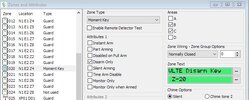
Which method you choose needs to be reflected in the particular zone used attributes section under "Zone Wiring - Zone Group Options"
In my case I used "Normally Closed" so my relay or switch would need to break the connection and remake it. If timing is an issue I suspect electronically the event would be instantaneous but 1 second (or 2) is probably more reasonable or it will not show in Wintex.

When I arrive home I need to disarm areas B&C (2&3). These two areas are selected in Zone 20 Attributes along with "Disarm Only". I don't need it to rearm as I will do that from the panel or a Smartkey or Smartcom when I need to.

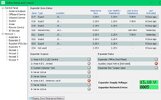
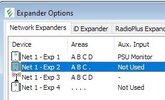
Using Wintex Diagnostics looking at Network 1, expander 2, my zone 20 is actually zone 4 on the expander.

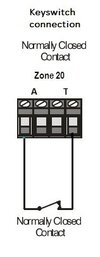
When I looked up the wiring for a keyswitch in the manual It was confusing. it seemed to want the tamper loop open circuit and partly connected to an open circuit zone contacts. My understanding of zone wiring was a pair of contacts and a Tamper always closed loop. Without a circuit diagram and no knowledge of internal components I could not work out how that could be correct so I wired up the zone contacts as for a normal door contact. No amount of programming changes made any difference it would not work. The resistances shown in Wintex were confusing as sometimes Zone 20 would show as active with 2.2k and other times active with 7K. Neither one would disarm an area. I checked the zone contacts with a multimeter to double check the Wintex resistances but that was not possible as there was 1.4v across the zone contacts.

With the kind assistance of "Secure I AM" it was confirmed that the Keyswitch.jpg picture was the correct way to go.
Normally closed resistance is now 0.00K as expected and active resistance is 814K.
There are no additional resistors used on any of my devices.

The disarm now works perfectly and reliably
 

Attachments

  • Expander 2.JPG
    Expander 2.JPG
    15.1 KB · Views: 3
  • Zone settings.JPG
    Zone settings.JPG
    50.4 KB · Views: 3
  • Zone resistances Secure.JPG
    Zone resistances Secure.JPG
    77.9 KB · Views: 4
  • Keyswitch.jpg
    Keyswitch.jpg
    11 KB · Views: 4
No worries, its hard to follow as to fault and solution but it is there.

The wiring was incorrect for the wiring type chosen, ie wired double pole but using normally closed.
 

If you need to find a tradesperson to get your job done, please try our local search below, or if you are doing it yourself you can find suppliers local to you.

Select the supplier or trade you require, enter your location to begin your search.


Are you a trade or supplier? You can create your listing free at DIYnot Local

 
Back
Top