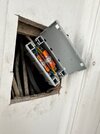
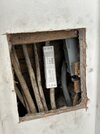
If it's okay with you lads, I would like to continue on my thread and ask some more questions...
Bank Holiday weekend allowed me to do some more progress on this, but it was a pain. I managed to drill through the joist and place a cable, but no chance to get it into the void.
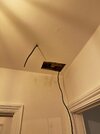
This is the top floor, so I paused this part for now. I did manage to install a heat alarm in my cellar and ran a cable up into the floor of my first floor, where I was able to install another smoke alarm on the ceiling to the ground floor.
I then tried to fish a cable from first floor up to the second floor and it was a proper pain. I tried with my cable rod from second floor down and from first floor up, but there was a blockage in the bottom third of the void. So I decided to cut an access hole too see what's going on. Got my trusty multitool and successfully severed two cables tripping the fuse with a bang..
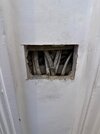
Upon opening the hole a bit more I think I understand what's going on and why I was not able to get my cable rod through. The void is completely filled up with plaster debris, but I think there is also a diagonal joist blocking the way. This is pretty much opposite of this! So whoever wired this house just took all the cables outside the void, ran them over and ONTOP of the laths, and just covered it with a plasterboard. Further down the cables go back inside the void again and come though into the floor normally. And of course I multi-tooled exactly where the cables are closest pressed against the plasterboard.
Anyway...damage done! Opened the hole a bit more and temporarily reconnected with some inline Wago's.
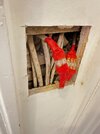
My question is, how should go about fixing this? The good news is that I am now able to run my fire alarm cable as I found the blockage. It appears all other cables are fine, but I cannot just push these wages back in, and both cables are part of a longer circuit, so I cannot just pull out the entire cable and replace with a fresh one. The only options I can think of:
1. Backbox with blanking plate and wagos inside (looks ugly)
2. Maintenance free JB inside (not sure if fits, might need to take out a lot of that debris)
3. install a single socket there as JB (don't really need a socket there, and also the other cable is a light circuit, so that would not solve the second severed cable)
Any other bright ideas?
Bank Holiday weekend allowed me to do some more progress on this, but it was a pain. I managed to drill through the joist and place a cable, but no chance to get it into the void.
This is the top floor, so I paused this part for now. I did manage to install a heat alarm in my cellar and ran a cable up into the floor of my first floor, where I was able to install another smoke alarm on the ceiling to the ground floor.
I then tried to fish a cable from first floor up to the second floor and it was a proper pain. I tried with my cable rod from second floor down and from first floor up, but there was a blockage in the bottom third of the void. So I decided to cut an access hole too see what's going on. Got my trusty multitool and successfully severed two cables tripping the fuse with a bang..
Upon opening the hole a bit more I think I understand what's going on and why I was not able to get my cable rod through. The void is completely filled up with plaster debris, but I think there is also a diagonal joist blocking the way. This is pretty much opposite of this! So whoever wired this house just took all the cables outside the void, ran them over and ONTOP of the laths, and just covered it with a plasterboard. Further down the cables go back inside the void again and come though into the floor normally. And of course I multi-tooled exactly where the cables are closest pressed against the plasterboard.
Anyway...damage done! Opened the hole a bit more and temporarily reconnected with some inline Wago's.
My question is, how should go about fixing this? The good news is that I am now able to run my fire alarm cable as I found the blockage. It appears all other cables are fine, but I cannot just push these wages back in, and both cables are part of a longer circuit, so I cannot just pull out the entire cable and replace with a fresh one. The only options I can think of:
1. Backbox with blanking plate and wagos inside (looks ugly)
2. Maintenance free JB inside (not sure if fits, might need to take out a lot of that debris)
3. install a single socket there as JB (don't really need a socket there, and also the other cable is a light circuit, so that would not solve the second severed cable)
Any other bright ideas?